Google Sheets · Net worth
Free Net Worth Tracker for Google Sheets (2026)
Free Google Sheets net worth tracker. Auto-syncs from 12,000+ banks, brokerages, and credit cards. No email signup, works in any Google account.
Free. No email. Works in any Google account. Opens a copy in your Drive.
Net worth tracker
Net Worth tab
Sample data
What's inside
Tab by tab
What each tab does and where its data comes from
One dashboard tab you read and three source tabs you fill. Finta can fill all three; by hand, one balance snapshot a month is enough.
- Net Worth
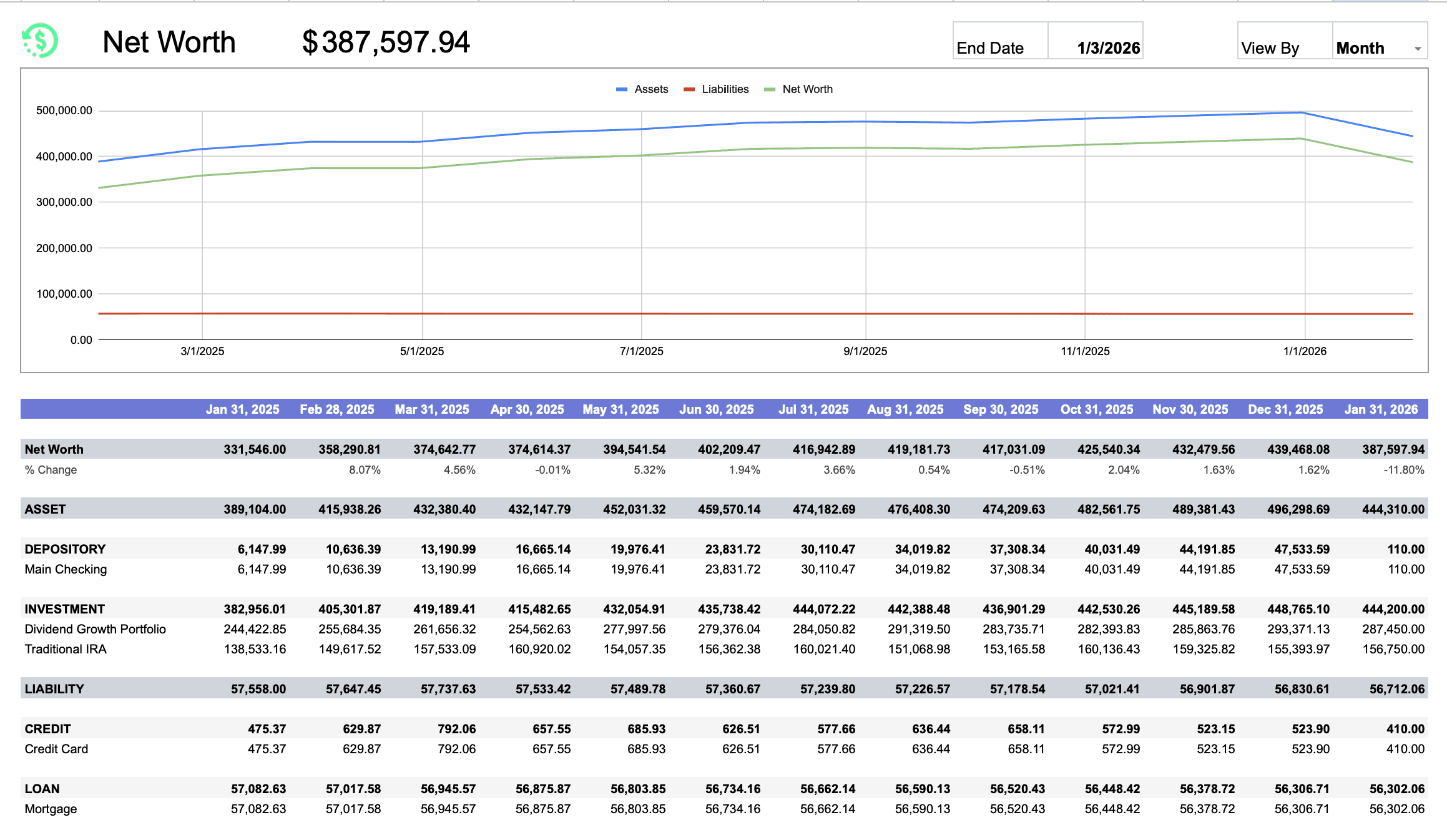
- Current net worth, period-over-period change, the trend chart, and the rollup by class, type and account. Switch Week, Month, Quarter or Year with the View By dropdown.
- Formulas · read only
- Bank Connections
- One row per bank, brokerage, credit union or lender. Only the name is required.
- Finta · Bank Connections
- Accounts
- One row per account with its type and subtype. Asset or Liability fills in on its own.
- Finta · Accounts
- Balance History
- Dated balance snapshots per account. This is what draws the trend. Finta adds a daily row.
- Finta · Balance History
Setup
Three steps to your first net worth number
Copy the template. It opens as a new sheet in your Google Drive.
List your banks and accounts, then type today's balances.
Add a balance snapshot once a month, or connect Finta and it adds one every day.
Keep it updated automatically
Let Finta keep the balances current
Connect your banks and brokerages, choose this sheet, and Finta writes accounts, balances and a daily snapshot into the three source tabs. The Net Worth tab keeps its formulas and its chart.
Your bank connects through Finta to this sheet.
Tables to enable
- Accounts
- Balance History
- Bank Connections
7-day free trial. No credit card required.
Net worth tracker questions
- How do you calculate net worth?
- Net worth is calculated by adding up all your assets (bank accounts, investments, property, vehicles) and subtracting all your liabilities (credit card debt, loans, mortgages). The formula is: Net Worth = Total Assets - Total Liabilities.
- Is this net worth tracker really free?
- Yes. The Google Sheets template is 100% free, no email signup, no payment, no trial. Click the make-a-copy link, save it to your own Google Drive, and use it forever. Finta (the bank-sync product) is a paid subscription with a 7-day free trial, but the template works on its own without ever connecting Finta.
- How often should I update my net worth tracker?
- If you're tracking manually, once a month is the sweet spot. Frequent enough to spot trends, not so frequent that it becomes a chore. Finta keeps connected data current based on provider timing and adds daily balance snapshots automatically. The Bogleheads community wiki recommends quarterly at minimum.
- Should I include my home in my net worth calculation?
- Yes. Include the current market value of your home (an estimate from Zillow or Redfin works) and subtract your remaining mortgage balance to get your home equity. That equity is a real part of your wealth and belongs in your net worth calculation. Some Bogleheads-style trackers exclude primary-residence equity to focus on liquid wealth, which is a valid alternative if you prefer that view.
- Should I include retirement accounts in my net worth?
- Absolutely. 401(k)s, IRAs, HSAs, and pensions are all part of your net worth, even if you cannot access the funds today without penalty. Including them gives you a complete picture of your financial health. The Federal Reserve's Survey of Consumer Finances includes retirement assets in its standard household net worth calculations.
- What is a good net worth for my age?
- There's no single right answer, but a useful benchmark is the U.S. median household net worth by age from the Federal Reserve's Survey of Consumer Finances. As of the 2022 SCF, the median was roughly $39,000 under age 35, $135,000 for ages 35-44, $247,000 for ages 45-54, $364,000 for ages 55-64, and $410,000 for ages 65-74. What matters more than the benchmark is whether your number is trending up year over year.
- Can I use this template for monthly net worth tracking?
- Yes. The Net Worth dashboard has a View By dropdown with Week, Month, Quarter, and Year options. Set it to Month, set the End Date to the last day you want to view, and the dashboard renders 13 monthly buckets ending on that date. Combine that with monthly entries in the Balance History tab and you have a full monthly net worth tracker.
- How do I track net worth across multiple bank accounts?
- Add each institution as a row on the Bank Connections tab, then add each account on the Accounts tab linked to its institution. The Net Worth dashboard rolls everything up automatically by Class (Asset or Liability), Type (depository, investment, credit, loan), and individual account. With Finta, all of this populates from a single sign-in to each bank or brokerage; manually, type the balances in once a month.
- Does this net worth tracker work for couples or shared finances?
- Yes. Add both partners' accounts to the Accounts tab and the dashboard treats them as one household. If you want to keep separate views, make two copies of the template (one per person) and a third combined copy. With Finta, you can connect both partners' bank logins to a shared workspace.
- What's the difference between a net worth tracker app and a spreadsheet?
- Apps like Empower or Monarch Money give you a polished mobile dashboard but lock your data inside their platform. A Google Sheets template like this one keeps your data in your own Google Drive, lets you customize anything, and works alongside the rest of your spreadsheets. With Finta connected, you get automatic bank syncing without giving up the flexibility of a spreadsheet.
Free Google Sheets template
Copy the tracker, then let the balances update themselves
The template is free. The Finta trial is 7 days, no credit card required.