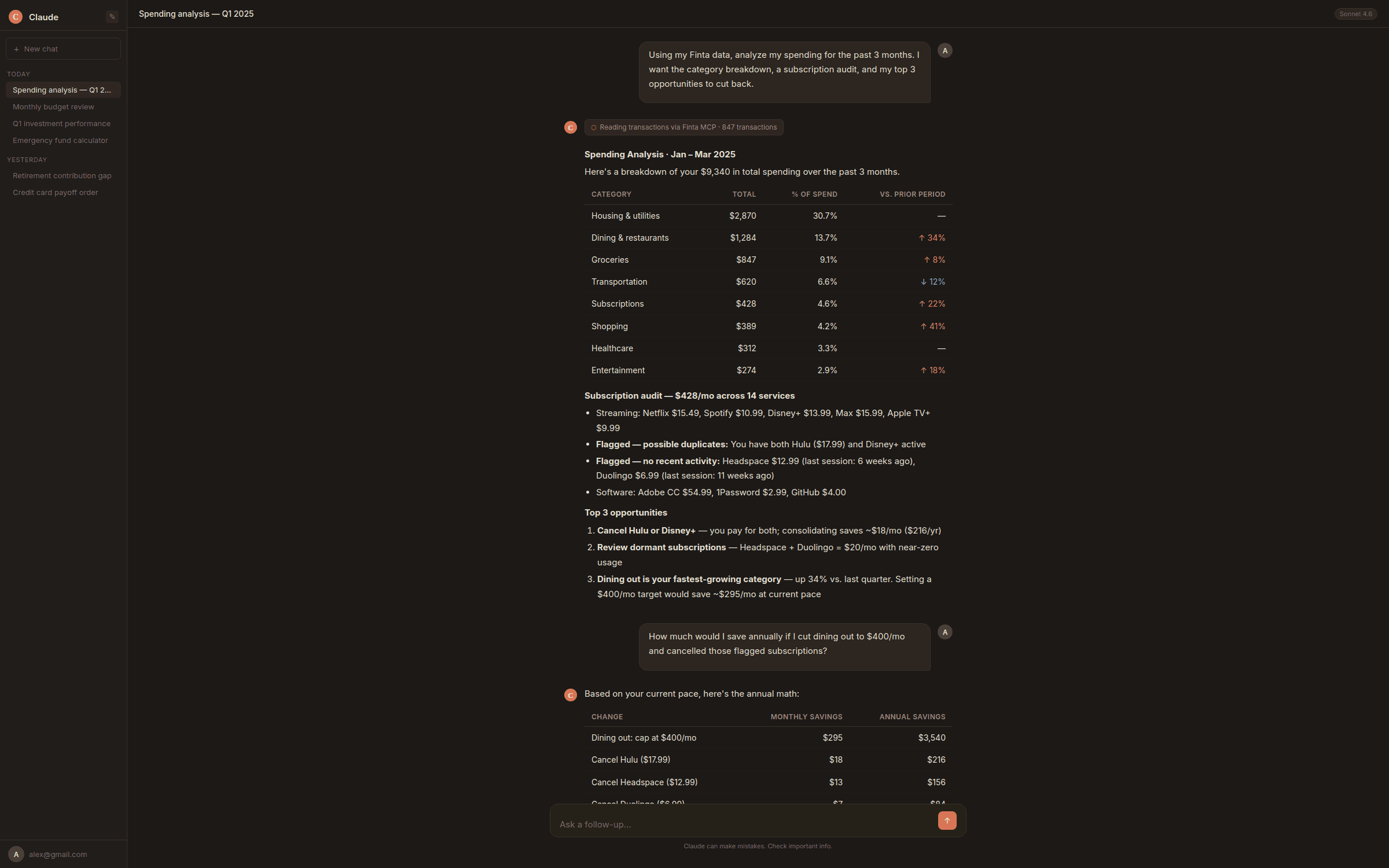
Ask any AI about your spending and it will answer confidently — patterns spotted, categories named, cuts suggested. The only problem: it has no idea what you actually spent.
That's not a bug in the AI — it's a data problem. ChatGPT, Claude, Gemini — none of them have access to your bank account. They're reasoning from training data and whatever you've told them in the conversation. Ask about your finances cold and you're getting a simulation of financial advice, not the real thing.
So you try to fix it. You export a CSV. You paste in a transaction list. You screenshot your credit card summary. Now it has your data — stale, incomplete, and gone the next time you open a new chat. Every conversation starts from scratch.
Most guides on using AI for personal finance are really guides on how to do that manual cycle slightly better. This one isn't. This is about what AI money management looks like when your data is already there, always current, every time you ask.
Why AI Money Management Advice Has Been Generic
Nearly half of Americans have tried using AI for some aspect of personal finance. Most of them hit the same wall.
The problem isn't the AI. Modern language models are genuinely good at financial reasoning — they understand compound interest, debt payoff strategies, budgeting trade-offs, tax implications. Ask ChatGPT to explain the avalanche method for paying off debt and you'll get a clear, accurate answer. Ask it to build a savings plan and it'll give you a sensible framework.
What it can't do is apply any of that to your situation — because your situation lives in your bank account, not in the conversation. The AI is working from whatever context you've given it, which is usually nothing, or a few rough numbers you typed in. It fills the gaps with reasonable assumptions. Those assumptions are often wrong."Cut back on subscriptions" and "build a three-month emergency fund" are correct in the abstract. They're useless without knowing what you're actually spending, what you actually have, and what you're working toward. The AI isn't wrong — it just doesn't know you.
That's a data problem. And data problems have solutions.
What Changes When Your Bank Data Is Live
The CSV workaround feels like progress, but it isn't. You're feeding a static snapshot to a system designed to reason dynamically. The data ages the moment you paste it. Close the tab and the next conversation starts from zero.
What changes everything is a persistent, live connection — an AI that can read your actual accounts, with current balances and real transactions, any time you ask. That's what MCP makes possible.
MCP stands for Model Context Protocol. The non-technical version: it's a standard that lets AI tools pull data directly from external sources on demand, instead of waiting for you to paste something in. Think of it like the difference between texting someone a photo of your fridge and letting them open it themselves — same fridge, but one view is live.
For personal finance, this is the difference between an AI that gives you advice calibrated to your actual situation and one that's filling in blanks. When the AI can see that you spent $340 on dining last month, that your credit card balance went up $600, and that your savings account hasn't moved — it stops being generic. It starts being useful.
Setting up a live connection manually takes some technical work. Tools like Finta handle it automatically — connecting your bank accounts once and making that live data available in Claude, ChatGPT, and any other MCP-compatible AI every time you ask. But whether you use a tool or wire it up yourself, live data grounding is what separates useful financial AI from confident-sounding guesswork.
What You Can Actually Ask Your AI Financial Coach
Here's what the difference looks like in practice — four questions worth asking once your financial data is live.
Where did my money actually go last month?Most people have a rough sense of their spending. Almost nobody has an accurate one. With live transaction data, you can get a real breakdown — not just the obvious categories but the subscriptions quietly renewing, the small purchases that compounded, the categories where you're spending more than you realized.
Which debt should I pay off first?"Look at my transactions from last month. What were my top 10 spending categories, what percentage of total did each represent, and are there any recurring charges I might have forgotten about?"
Avalanche vs. snowball has a mathematically correct answer for your specific numbers — but most people never run it because pulling together balances, rates, and minimum payments from multiple accounts is tedious. With live data, the AI already has most of what it needs. You fill in the gaps it can't see, like interest rates, and it runs the comparison.
Is my net worth actually growing?"Based on my account balances and payment history, compare the avalanche and snowball payoff methods for my situation. Which would cost me less in total interest?"
Checking balances one by one doesn't tell you much. With account balance history, you can ask for a net worth timeline — not just today's number, but how it's trended over months or years, and what's actually driving the change.
Can I afford to do this?"Using my account balance history, calculate my net worth today and at 6-month intervals going back as far as you can. What's the trend, and what's driving it?"
The answer to almost every "can I afford X" question depends on your actual cash flow — not a generic budget template. Real income, real recurring expenses, real savings rate. With live data, the AI can tell you whether your surplus actually supports what you're considering.
These prompts work with any AI that has access to your financial data. If you want them pre-built — along with templates for dividend income, retirement readiness, and household budgeting — Finta's prompt template gallery has all of them ready to run."Based on my income and spending over the last three months, what is my actual monthly surplus? If I wanted to save $[X] by [date], what would I need to change?"
How to Get Started
Getting started with live financial data takes about five minutes.
1. Create a free Finta account No credit card required — sign up at finta.io. 2. Connect your bankFinta supports 12,000+ institutions through Plaid. Search for your bank, log in, and your accounts are linked. Most connections take under a minute.
3. Enable the Finta MCP Add Finta as an MCP server in your AI tool of choice. Finta's MCP setup docs walk through it for Claude and ChatGPT — about two minutes. 4. Ask anythingOpen a conversation and start. Your transactions, balances, and account history are live. Nothing to upload, nothing to prep, nothing that expires.
If you'd rather work without a dedicated tool, you can — export your transactions, paste them in, and ask your questions. It works. You'll just be starting from a snapshot every time, and you'll need to repeat the process whenever you want current numbers.
Frequently Asked Questions
If you want the live data part handled automatically, Finta's free trial takes about five minutes — connect your bank, enable the MCP, and your financial data is live in any conversation. No credit card required.